What a 14-inch laptop actually takes up on a desk
Screen diagonal does not tell you the footprint. Manufacturer dimension tables do, and the step between sizes is smaller than the label suggests.
Updated:
The inch number is a diagonal, not a footprint
A 14 inch laptop is named after the diagonal of its display panel. That single measurement does not tell you the width of the machine, its depth on a desk, or whether it fits a bag. Those come from the chassis around the panel, and manufacturers publish them separately.
The gap matters because bezels, hinges and cooling differ between designs. Two machines sold as 14 inch can differ by more than a centimetre in width, and a thin 15 inch design can occupy less depth than a thicker 14 inch one. The diagonal sets a rough expectation; the dimension table settles it.
What one size step costs in millimetres
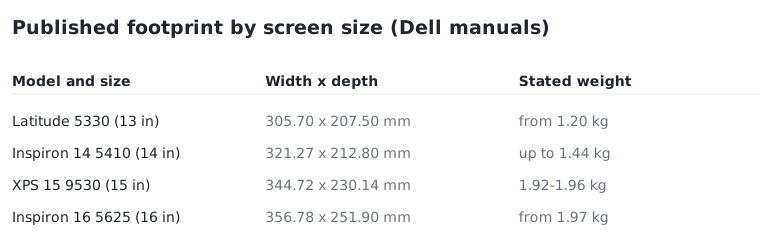
Dell publishes a dimensions and weight table in the support manual for each model, which makes a like-for-like comparison possible. Taking one model per size: the 13 inch Latitude 5330 is 305.70 mm wide and 207.50 mm deep. The 14 inch Inspiron 14 5410 is 321.27 by 212.80 mm. The 15 inch XPS 15 9530 is 344.72 by 230.14 mm, and the 16 inch Inspiron 16 5625 is 356.78 by 251.90 mm.
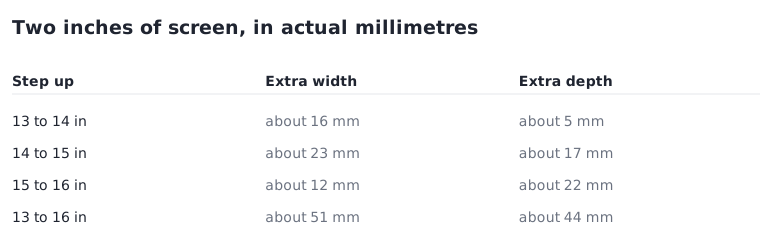
Read as steps, the numbers are less dramatic than the labels. Moving from 13 to 14 inch adds roughly 16 mm of width and 5 mm of depth. Moving from 14 to 15 adds about 23 mm and 17 mm. Across the whole range, 13 to 16 inch is about 51 mm wider and 44 mm deeper — real, but closer to the width of two fingers than to the jump the names imply.
| Published model and size | Width x depth | Stated weight |
|---|---|---|
| Latitude 5330, 13 inch | 305.70 x 207.50 mm | from 1.20 kg |
| Inspiron 14 5410, 14 inch | 321.27 x 212.80 mm | up to 1.44 kg |
| XPS 15 9530, 15 inch | 344.72 x 230.14 mm | 1.92 kg, 1.96 kg with OLED touch |
| Inspiron 16 5625, 16 inch | 356.78 x 251.90 mm | from 1.97 kg |
Where the real numbers live
Retail listings often repeat the diagonal and omit the chassis. The manufacturer support manual for a specific model carries a dimensions and weight page with front height, rear height, width, depth and weight. That page is the one to open before ordering, and it is tied to a model number rather than to a product family.
Front and rear height are listed separately for a reason: most laptops are wedge-shaped. The XPS 15 9530 is published at 18 mm at the front and 11.65 mm at the rear. If you are planning for a sleeve or a drawer, the thicker of the two is the measurement that has to fit.
There is a second reason to go to the manual rather than the listing. A product family often spans several chassis across its lifetime, so a dimension quoted in a review of last year’s revision may not describe the unit being shipped now. The support manual is organised by model number and revision, which is the level at which the figures are actually fixed. If the listing does not state a model number precisely enough to find that page, that itself is useful information about the listing.
Weight is a range, not a value
Manufacturers qualify weight carefully. Dell lists the XPS 15 9530 at 1.92 kg for the non-touch display and 1.96 kg for the OLED touchscreen, and states that the weight of your computer depends on the configuration you ordered. Other models are published as a minimum, which means the configuration you choose can only move upward from there.
There is also a number that appears on no spec sheet: the charger. A laptop carried daily is carried with its power adapter, and the pair is what your shoulder experiences. The published figure is the machine alone, so treat it as a floor for the bag rather than the answer.
Measuring before you order
Two measurements at home resolve most size questions without handling the machine. Mark the published width and depth on the desk with tape and leave whatever else normally sits there in place. Then measure the internal dimensions of the bag you intend to use, including the thicker front edge of the laptop.
Depth is the one people under-plan. A 16 inch chassis at 251.90 mm deep leaves noticeably less room in front of the keyboard on a shallow desk, and that space is where hands and documents go. Width tends to be forgiving; depth is not.
Before you order
Every item here is published for the exact model, and none of it requires handling the machine first.
- Open the dimensions and weight page in the support manual for the exact model number.
- Note width, depth and the larger of the two heights.
- Check whether the weight is published as a minimum, a maximum, or per display option.
- Add the charger to any bag calculation.
- Tape the footprint on your desk and leave your monitor, keyboard and papers where they are.