Read a laptop keyboard specification before you order
Key count, key pitch and backlight are published per model and per region. They answer more about daily typing than any adjective in a product description.
Updated:

A laptop keyboard specification is a short, checkable list
Product descriptions describe a laptop keyboard with adjectives. The manufacturer specification does something more useful: it lists keyboard type, layout, the number of keys for each region, and the key pitch in millimetres. Those four items are checkable before the machine arrives, and together they describe the typing surface more precisely than any review summary.
The specification page sits in the same support manual as the dimensions table, under its own keyboard heading. It is tied to an exact model number, which matters because keyboard details vary between configurations of the same product family.
Key count tells you the layout and whether there is a numeric keypad
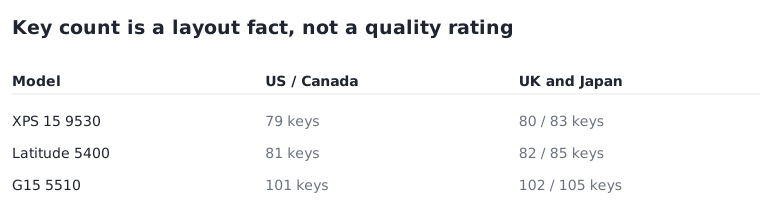
Dell lists key counts per region. For the XPS 15 9530 the figures are 79 keys for the United States and Canada, 80 for the United Kingdom and 83 for Japan. The Latitude 5400 is listed at 81, 82 and 85 for the same three regions. The difference between regions is layout, not quality: the UK layout adds a key, and Japanese layouts add several for input switching.
A larger gap signals something else. The Dell G15 5510 is published at 101, 102 and 105 keys for the same regions, roughly twenty more than the XPS. That jump is a numeric keypad. If you work with figures, the key count on the specification page tells you whether the pad is there without needing a photograph, and it is also a clue to how far left the main typing area sits.
| Model | US and Canada | UK / Japan | What the count indicates |
|---|---|---|---|
| XPS 15 9530 | 79 keys | 80 / 83 | No numeric keypad |
| Latitude 5400 | 81 keys | 82 / 85 | No numeric keypad |
| G15 5510 | 101 keys | 102 / 105 | Numeric keypad present |
Key pitch is the number that describes typing
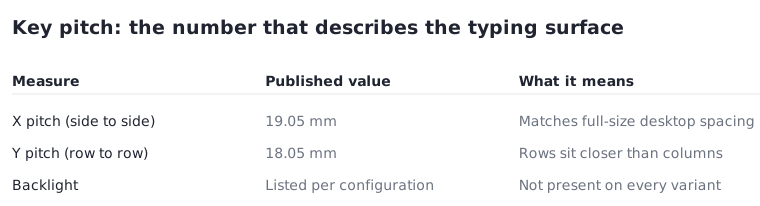
Key pitch is the distance from the centre of one key to the centre of the next. Dell publishes it on two axes for the XPS 15 9530: 19.05 mm on the X axis and 18.05 mm on the Y axis. The first figure is worth remembering, because 19.05 mm is the spacing of a full-size desktop keyboard. A laptop that publishes it has not compressed the horizontal layout.
The vertical figure being smaller is normal; rows sit closer together than columns on almost every laptop. Where pitch is published below about 18 mm horizontally, the layout has been narrowed to fit a smaller chassis, and that is the compromise a compact machine is making. Pitch is a physical fact, so it is one of the few typing-related specifications that transfers reliably from a page to your hands.
The vertical figure deserves one more look. At 18.05 mm against 19.05 mm horizontally, rows are a millimetre closer than columns, which is why vertical mistypes between adjacent rows are the common complaint on compact machines rather than horizontal ones. Where a manufacturer publishes only a single pitch value, it is normally the horizontal one, and the vertical spacing is then unstated rather than equal.

Backlight is a configuration, not a model feature
Backlight appears on the specification as a keyboard type. Dell lists the XPS 15 9530 as a standard backlit keyboard, while the Inspiron 14 5410 2-in-1 is published with both non-backlit and backlit options, and the G15 5510 adds a four-zone RGB variant. The same product name can therefore arrive with or without illumination depending on the configuration ordered.
This is a frequent and avoidable disappointment. Because the option sits in the configuration rather than the model name, a listing that repeats only the model is not evidence either way. The keyboard type line on the specification page for the exact configuration is.
The function row behaves differently than people expect
Dell describes keys carrying two symbols: pressing Shift with the key types the alternate character, and pressing Fn with the key performs the secondary function. For the F1 to F12 row this means the default behaviour can be either the media controls or the traditional function keys.
The useful detail is that the default is adjustable in BIOS settings rather than fixed in hardware. If you rely on F-keys in a particular application, the question is not whether the machine supports them but which default it ships with, and that is a setting you can change rather than a reason to choose a different model.
Before you order
All of the following appear on the keyboard page of the support manual for the exact model, and resolve before delivery.
- Read the key count for your region and compare it with another model to spot a numeric keypad.
- Check the X-axis key pitch; 19.05 mm matches full-size desktop spacing.
- Confirm the keyboard type line of your configuration if you need a backlight.
- Note that the function-row default is a BIOS setting, not a fixed property.
- If you order from a different region, expect the layout of that region, not your own.